Bluetooth 5.3 Wireless Gaming Earbuds: HD Stereo
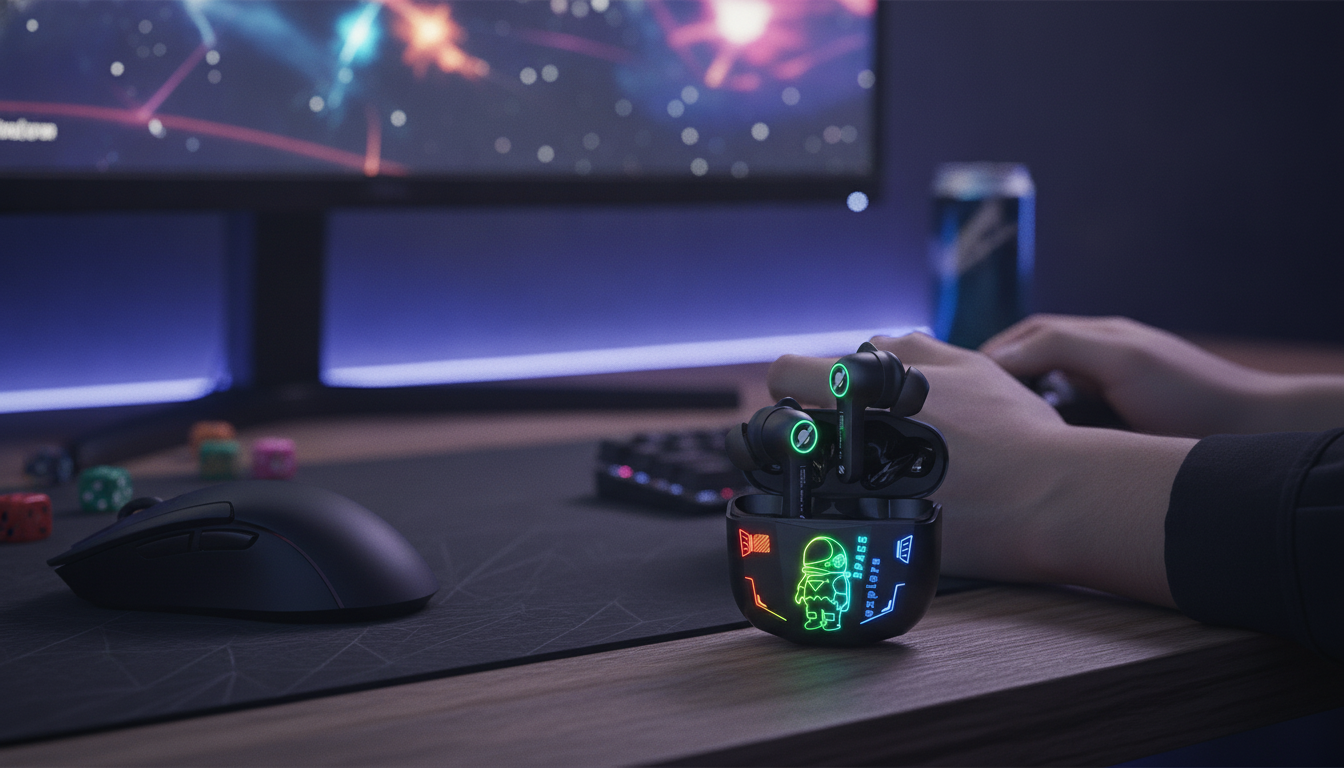
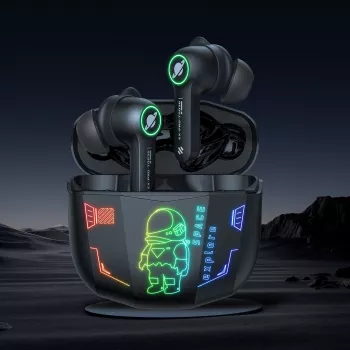
Wireless Gaming Earbuds with Bluetooth 5.3 & HD Stereo Sound
Fast pairing, stable wireless performance, and clear stereo audio matter most when every footstep cue and voice call counts. These wireless gaming earbuds are built around low-lag listening expectations, punchy HD stereo sound, and everyday comfort—so they make sense for gaming sessions at home, quick commutes, and casual calls in between.
What makes these earbuds feel “game-ready”
“Game-ready” audio is less about huge specs on paper and more about how consistently the earbuds perform in real-world conditions. When pairing is quick, the connection stays steady, and the stereo image is clean, it’s easier to stay locked in—especially in shooters, racing games, and any title where timing matters.
- Bluetooth 5.3 connectivity supports smoother pairing and more reliable performance in busy wireless environments.
- Stereo sound tuned for detail can help positional cues like footsteps and reloads stand out.
- A solid in-ear seal can improve perceived bass and reduce outside noise without needing high volume.
- A pocketable charging case keeps the setup simple for travel and quick top-ups between matches.
Bluetooth 5.3 benefits for gaming and daily use
Bluetooth performance can make or break wireless earbuds for gaming. While latency depends on the full chain (device, codec, game, and interference), newer Bluetooth stacks are generally designed to improve efficiency and stability. For a deeper technical reference, see the Bluetooth Core Specification.
- More efficient wireless signaling can help maintain a steadier connection when moving around.
- Improved device switching behavior on modern phones, tablets, and handheld consoles that support newer Bluetooth stacks.
- Lower power behavior in typical listening, supporting longer time between charges (varies by volume and usage).
- Reduced interruptions in crowded places compared with older wireless setups, especially when the phone is kept nearby.
For best consistency, keep your source device close (desk, pocket, or controller-adjacent) and avoid blocking the signal with dense objects or a tightly packed bag.
HD stereo sound: what to listen for
“HD stereo sound” is most noticeable when details remain separate—highs stay clean, bass stays controlled, and voices don’t get buried. That separation is what makes directionality feel more obvious and voice chat more intelligible.
- Clear highs for game effects and dialogue without harshness at moderate volume.
- Controlled bass that adds impact to explosions and music without smearing details.
- Good channel separation for left/right directionality in shooters and racing games.
- Balanced mids for voice chat clarity, helping teammates sound more intelligible.
| Use case | What to test | What “good” sounds like |
|---|---|---|
| Competitive gaming | Footsteps, reloads, distant shots | Easy to place direction and distance without boosting volume |
| Music | Kick drum + vocals + cymbals | Bass hits without drowning vocals; cymbals stay crisp |
| Calls/voice chat | S and T sounds, background noise | Voices stay clear; less hiss and fewer dropouts |
Comfort, fit, and staying power during long sessions
Fit is a performance feature. A secure seal can make the stereo image feel more stable, improve bass response, and reduce how loud you feel you need to play. The right tip size also helps keep the earbuds seated through long matches, walking, or commuting.
- A secure in-ear fit helps keep audio consistent, especially for bass and positional cues.
- Tip size matters: too small can reduce bass; too large can cause pressure and fatigue.
- For glasses wearers and commuters, a stable seal reduces the temptation to raise volume.
- A good fit can also improve microphone performance by reducing the need to speak loudly.
If your audio suddenly feels thin or “far away,” try a larger ear tip for a tighter seal. If you feel pressure after 20–30 minutes, go one size down and re-seat the earbuds with a gentle twist instead of pushing deeper.
Setup and everyday usage tips
These earbuds are designed to stay simple: pair quickly, keep the connection reliable, and handle the routine of daily carry. A few small habits can also prevent common issues like charging inconsistencies and muffled sound.
For safer listening habits during long sessions, keep volume moderate and take breaks—guidance is available from the WHO safe listening resources.
Who these earbuds are best for
Product details and where to get it
If you want a compact, game-friendly setup with modern Bluetooth and clear stereo tuning, the Wireless Gaming Earbuds with Bluetooth 5.3 & HD Stereo Sound are currently in stock at $39.51. For the most consistent sound, pair them with a stable Bluetooth source device and take a moment to find the most comfortable ear tip size for a reliable seal.
Optional add-on for a bigger screen setup
For dorm rooms or living rooms where you want a larger display for co-op nights and streaming, the 4K WiFi Projector with Dual Screen & Android OS is also in stock and pairs well with a wireless, clutter-free setup.
FAQ
Will Bluetooth earbuds have noticeable delay in games?
Perceived delay depends on your device, Bluetooth codec support, the game, and local wireless interference. Bluetooth 5.3 can improve connection stability, but latency can still vary—keep the source device close and test any in-game audio settings that affect sync.
Do these earbuds work for voice chat on phones and tablets?
Yes—on most phones and tablets, Bluetooth earbuds work for standard calling and in-app voice chat. If the mic isn’t picked up, reconnect the earbuds, confirm the app has microphone permission, and check that the earbuds are selected as the input device.
How can sound be improved without increasing volume?
Start by switching ear tip sizes to get a better seal, then use a light EQ boost for clarity (often upper mids) instead of raising overall volume. Keep sound ports clean and reduce background noise when possible to hear details more easily at safer listening levels.




Leave a comment